Taking an academic/scientific approach to designing instruction (as opposed to just defaulting to “what’s always been done”) is a valuable step in meeting the expectations for quality instruction that college students have today.1
Backward Design
What is Backward Design?
Backward design involves beginning the process with the end in mind. When writing learning objectives, consider what you want students to know by the end of the lesson. Once you’ve established that, you can move to making decisions about how you will support their learning. In the video below, “Napoleon Schmoleon – What is the GOAL!?” from the YouTube series, Five Moore Minutes, Shelley Moore walks us through an example of how to use backward design when planning instruction. Her environment is K12, but the principle applies to all levels of education.
These are the three core steps to any instructional design:
Start with your learning objectives, potentially breaking them down into stepping stone learning goals (scaffolding).
Design varied and authentic formative and summative assessments to measure mastery of those learning goals/objectives.
Create and curate the instructional content that students need in order to complete those assessments.
The Course Design Plan (CDP) templates (linked below) that we have developed help guide you through this sequence while ensuring engagement and inclusion. A CDP can provide necessary structure for your course as you develop it.
This is the instructional design stage that is least altered by modality (e.g. online, face-to-face, hybrid). The list of objectives from the course syllabus can often be a bit broad, so it is important to break those down a bit into smaller learning goals. When breaking down those goals, avoid being overly specific as to how the student will be demonstrating their learning; CAST expresses this as “separating the means from the ends.”Here are a couple of examples:
Learning Objective: Use web design best practices and graphic design principles to design and publish a responsible, effective, and accessible blog. (DIGL 101)
Learning Goal: Identify the purpose and audience of your blog.
Learning Goal: Reflect on what you learned throughout the semester about privacy, accessibility, copyright, and graphic design principles.
Learning Objective: Demonstrate the ability to use multimedia in course materials that are accessible. (EDME 552)
Learning Goal: Identify factors in the accessibility of digital content.
Learning Goal: Apply WCAG 2 guidelines in the creation of online content.
Learning Goal: Create documents that meet accessibility guidelines.
Learning Goal: Create a video that meets accessibility guidelines.
Pro Tip: If you’re struggling a bit with drafting those specific learning goals, it might be helpful to reference the action verbs in Bloom’s Taxonomy.
GenAI Opportunity: If you’re struggling to get started, consider using a generative AI tool (e.g., ChatGPT, Perplexity, Copilot Chat). You can can start your process with the following prompt:
I’m a professor teaching [subject] to [undergraduate or graduate] students. I would like you to serve as an instructional design coach in helping me to break down my course learning objectives into smaller, more measurable learning goals. Do you have any questions for me before we begin?
Firstly, consider what types of assessments work best for your delivery format. Will your assessment be conducted synchronously or asynchronously? Will it be online/digital or on paper/in class? If you’re considering assessments that are completed online, check out Create Online Activities.
Formative & Summative
Regardless of the delivery format, it’s important to include a mix of formative and summative assessments. These tie to those learning goals/objectives — the formative assessments measure progress on those stepping stone learning goals while the summative assessments measure mastery of the broader learning objective. Formative assessments can be separate low-stakes assignments or drafts/checkpoints of larger projects. Here’s what those formative and summative assessments might look like from our earlier examples:
Learning Objective: Use web design best practices and graphic design principles to design and publish a responsible, effective, and accessible blog. (DIGL 101) Summative Assessment: Publish a blog with at least three posts on a topic of your choice.
Learning Goal: Identify the purpose and audience of your blog. Formative Assessment: Online discussion forum where students share their drafted purpose/audience and get peer feedback.
Learning Goal: Reflect on what you learned throughout the semester about the privacy, accessibility, copyright, and graphic design principles.
Formative Assessment: Project Journal entries with questions relevant to those reflection topics, feedback provided via rubric criteria.
Learning Objective: Demonstrate the ability to use multimedia in course materials that are accessible. (EDME 552) Summative Assessments: Creating an accessible HTML content page; ethics manual final draft; and final screencast video. (since this goal is very broad, there are multiple summative assessments)
Learning Goal: Identify factors in the accessibility of digital content. Formative Assessment: Discussion forum about digital accessibility
Learning Goal: Apply WCAG 2 guidelines in the creation of online content. Formative Assessment: Critique peer content using WCAG 2 guidelines
Learning Goal: Create documents that meet accessibility guidelines. Formative Assessment: First draft of ethics manual
Learning Goal: Create a video that meets accessibility guidelines. Formative Assessment: First two screencast videos
Variety
Another important factor in designing assessments is to make them varied. Students are incredibly diverse in their skills, strengths, experiences, and interests, so your assessments should be as varied as possible (a principle of Universal Design for Learning [UDL]). This means offering choices within a particular assignment (when feasible) AND varying the types of assignments throughout the course. Here are a few examples:
Assessments
Options for Variability
Online discussion forum where students share their drafted purpose/audience and get peer feedback.
Project Journal entries with questions relevant to those reflection topics, feedback provided via rubric criteria.
Publish a blog with at least three posts on a topic of your choice.
Students have options for expression as they can use text or audio/video posts, and they have options for choice in that the purpose/audience is totally up to them (not assigned).
This assignment is more structured (not a range of options).
Students have options for choice in that they can choose the subject of their blog; they have some options for expression as blog posts can be made up of text, audio, video, or images.
Across these assignments, we see a variety in the engagement style (e.g. collaborative vs. independent work). There’s also a variety in types of assignments, i.e., discussion (student-to-student), journal (student-to-teacher), outward-facing blog (student-to-world).
Discussion forum about digital accessibility
Critique peer content using WCAG 2 guidelines
First draft of ethics manual
First two screencast videos
HTML content page project
Ethics manual final draft
Final screencast video
Students have options for expression as they can use text or audio/video posts.
Students have options for expression as they can use text or audio/video posts.
Students can format their ethics manual as a document, a website, a slide deck, or a podcast/video series.
This assignment is more structured (not a range of options).
Students have options for choice in that the purpose/audience is totally up to them (e.g., for elementary students, high school students).
Students can format their ethics manual as a document, a website, a slide deck, or a podcast/video series.
This assignment is more structured (not a range of options).
Across these assignments, we see a variety in the engagement style (e.g. collaborative vs. independent work). There’s also a variety in types of assignments, i.e., discussion (student-to-student), screencasts (student-to-teacher), outward-facing content page and ethics manual (student-to-world).
For help on creating assessments in Canvas, please see the “Create Activities” section of our Canvas: Faculty Introduction page of the Tech Support Knowledge Base.
Create and Curate Instructional Content
Create and Curate Instructional Content
This final course design stage involves creating and curating the instructional materials that give students the information they need to complete the assessments successfully. Instructor-created content can be synchronous lecture (in-person or in Zoom), video recordings, PowerPoints, etc. (check out the best practices on Create Digital Content). Course content also often includes external sources like guest speakers (in-person or in Zoom), web articles, scholarly sources, TEDtalks, etc., where content curation skills are important.
Ultimately, you need to balance the amount of instructor-created and external materials to maintain teacher presence without reinventing the wheel and/or burning out.A good first step is to explore what content already covers your material well (textbook, YouTube, etc.), then focus your energy on creating original content for the parts of your material that you can’t find good content for. Keep in mind how teacher presence in your materials contribute to the “instructional time” designated for your course (see Class Time in Online/Hybrid Courses for details).
Lastly, when creating and curating instructional content, it’s important to consider the diversity of your students. Mix up the methods/media that you use, like in-person lecture, recorded video, podcast, infographic, text, etc. This will support students by giving them a variety of ways to connect with your content (more UDL!).
Here’s how that mix of content might look in a F2F course (DIGL 101, Blogging Module):
External | Video: “An Introduction to Blogging” (3-4 min)
External | Text Articles:
“Blog Introductions: Examples of Both the Good and Bad (And How to Be Awesome)”
“How to Write an Awesome Blog Post in 5 Steps”
“20 Examples of Successful Blogs That Will Get You Inspired Now”
“Blogging: Fundamentals”
“The Daily Post”
Instructor-Created | Text-based Canvas Pages:
“Purpose & Audience”
“Privacy”
“Copyright Considerations for Blogging”
Instructor-Created | Video (with text): “Accessibility (POUR)”
External | Video: “7 Blogging Tips that will Make Your Blog Successful (Storytelling Techniques)” (with instructor-written context information)
Instructor-Led | Class Discussion: Presenting good and bad examples of blogs and noting best practices via class discussion and instructor direction
Here’s how that mix of content might look in an online course (EDME 552, Accessible Content):
External | Text: “Access & Equity for All Learners in Blended & Online Education” (with instructor-created guiding questions)
External | Text:“Making Online Learning Accessible to All Students” (with instructor-created guiding questions)
External | Text: “Creating Digital Lessons that Support Learning Differences” (with instructor-created guiding questions)
For help on adding content items to your Canvas modules, please see the “Create Content” section of our Canvas: Faculty Introduction page of the Tech Support Knowledge Base.
Consider This . . .
Reflect on how you design you own lessons/courses — do you follow this sequence? How might you enhance future course/lesson design with these suggestions?
ADDIE
Now that you have an understanding of the backward design process, we can use a popular conceptualization to put this all into action: ADDIE. The term “ADDIE model” (or “ADDIE process”) is widely used to describe the stages of all instructional design models. It is “an acronym referring to the major stages in the generic ISD [instructional systems development] process.”2 These stages are described in the short video below:
These five steps provide the framework for developing and improving a course over time. Each step provides critical information for the next step.
Analyze – Based on your course’s learning objectives as well as the strengths and needs of your learners, identify the knowledge and/or skills that your students need to learn (Backward Design Part 1: Learning Goals).
Design – Plan out the assessments and content needed for your students to achieve the goals/objectives (start Backward Design Parts 2 & 3: Design Assessments and Create and Curate Instructional Content).
Develop – Create the content and assessments for your course (finish Backward Design Parts 2 & 3: Design Assessments and Create and Curate Instructional Content).
Implement – Facilitate the content and assessments in your course.
Evaluate – Review feedback and take time to reflect on how the course went. Were there areas where students struggled? Do you need more scaffolding in some areas? Did your assessments accurately measure your objectives? What changes do you need to make before the course runs again?
ADDIE + UDL
This instructional design process aligns well with the principles of Universal Design for Learning (UDL). At each stage of ADDIE, you need to keep in mind the diversity of your learners’ affective, recognition, and strategic brain networks. Jodie Black and Eric J. Moore (2019) have developed specific questions for each stage to help you consider that diversity while planning: ADDIE Model Module Plan Worksheet.
Trauma-Informed ADDIE
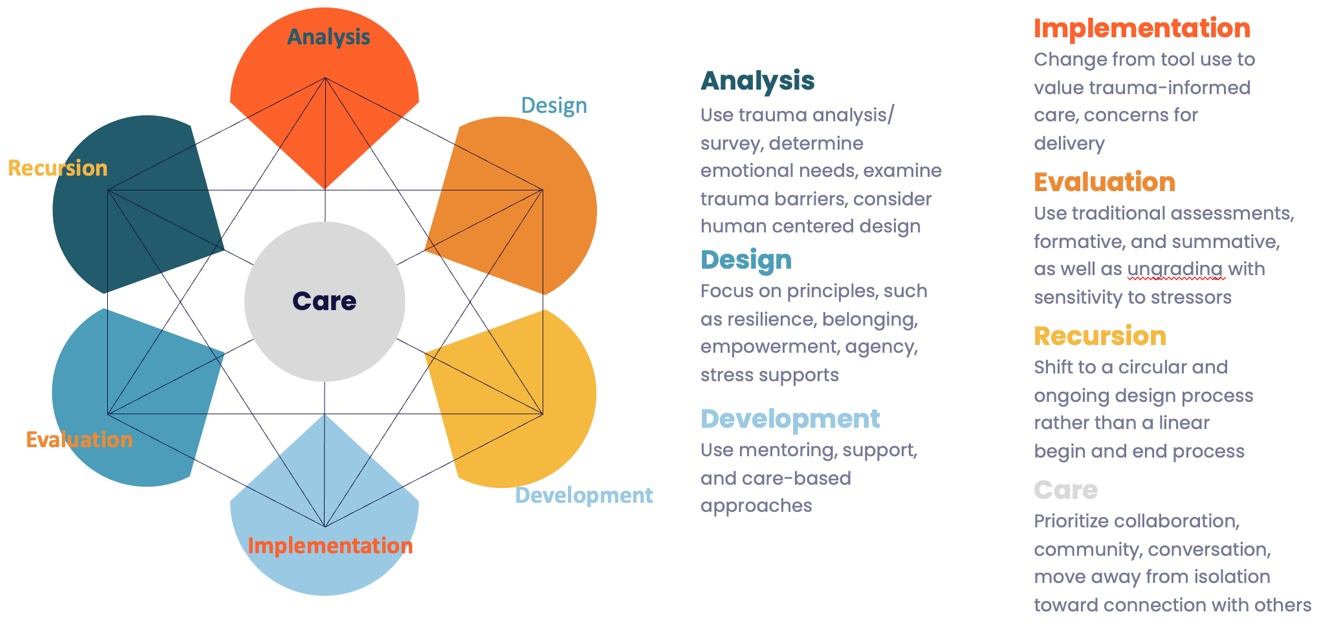
Educators are now more than ever aware of the role student mental health plays in the learning process. Multiple factors outside the classroom can impact a student’s ability to engage with course content and/or peers. To address this, the ADDIE model has been expanded to include a trauma-informed approach, placing student care at the core of the development process. This graphic from the Educause article “TI-ADDIE: A Trauma-Informed Model of Instructional Design” provides a quick snapshot of how this information can be integrated into the design process.
Image credit: Ali Carr-Chellman and Treavor Bogard | Text Transcript
Consider This . . .
Reflect on how you design you own lessons/courses — do you start with the objectives, then the assessments, and finally the content? Do you include each of the five stages of ADDIE? Do you include the two additional stages for trauma-informed ADDIE? How might you enhance future course/lesson design with these suggestions?